
A well-designed trading workspace can make it easier to analyse markets, manage risk, and execute trades without unnecessary distractions. Whether you trade stocks, futures, options, or commodities, your environment influences how efficiently you process information and follow your trading plan.
However, an effective trading workspace does not require an expensive computer, multiple monitors, or complicated software. The goal is to create a comfortable, reliable, and organised setup that supports your trading strategy. By choosing the right equipment, arranging essential tools, improving internet reliability, and establishing a consistent routine, you can build a workspace that helps you make more disciplined trading decisions.
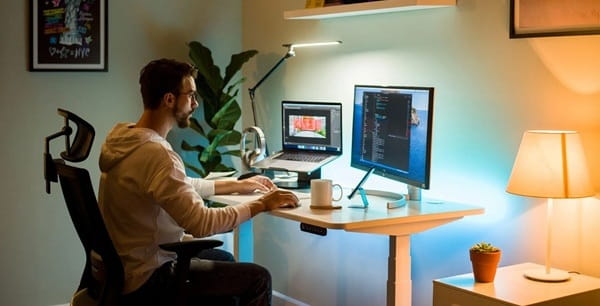
Choose a Suitable Location
The first step is selecting a location where you can concentrate without frequent interruptions. Trading often requires careful attention to price movements, market news, order details, and risk limits. Noise and distractions can make it harder to evaluate information accurately.
Choose a quiet area with sufficient lighting, comfortable seating, and enough space for your computer and other essentials. Natural light can be helpful, but position your monitor to avoid glare from windows or overhead lights.
If you work or study from home, consider separating your trading area from entertainment and household activities. Even a small dedicated desk can provide a more structured environment.
Your workspace should also be comfortable for extended sessions. An adjustable chair, a desk at an appropriate height, and a monitor positioned near eye level can help reduce neck, shoulder, and back strain.
Select the Right Computer and Monitors
Your computer should match the demands of your trading activities. For basic stock trading, chart analysis, and order placement, a reasonably capable modern laptop or desktop is often sufficient.
Traders who run multiple analytical applications, process large datasets, or develop algorithmic strategies may benefit from a more powerful processor, additional memory, and faster storage. The exact specifications depend on the software being used.
A second monitor can make it easier to view charts, watchlists, news, and order information simultaneously. For example, one screen could display price charts while another shows your trading platform and market updates.
However, multiple monitors are optional. A single well-organised screen can work effectively if you arrange windows carefully and focus on the information relevant to your strategy.
Prioritise reliability, readability, and responsiveness over impressive specifications. A complicated setup does not automatically improve trading performance.
Arrange Your Trading Software
Trading software is the central part of a digital trading workspace. Choose a platform that provides the instruments, charting features, order types, and account information you actually need.
For Indian equity traders, this generally means using a broker’s authorised trading platform and checking relevant exchange information when necessary. Commodity and derivatives traders should confirm that their platform supports their intended products and provides the required contract details.
Your workspace may include:
- A trading platform for placing and managing orders.
- Charting software for technical analysis.
- A watchlist containing selected instruments.
- Reliable market news and relevant economic announcements.
- A trade journal for reviewing decisions and performance.
- A calculator or spreadsheet for position sizing and risk calculations.
Avoid filling your screen with unnecessary indicators, news feeds, and watchlists. Too much information can increase confusion rather than improve analysis.
Organise the workspace around your trading method. A long-term investor may need company financials and portfolio information, while an intraday trader may prioritise charts, price alerts, and order management.
Ensure a Reliable Internet Connection
A stable internet connection is essential for accessing trading platforms, monitoring prices, and submitting orders. Connection problems during active market hours can interfere with execution and increase uncertainty.
Use a reliable broadband connection where possible. If you frequently experience interruptions, consider keeping a mobile hotspot available as a backup.
Your backup should be practical and tested before you need it. Confirm that your device can connect to the alternative network and that you know how to access your broker’s platform if your primary connection fails.
Remember that an internet connection alone does not guarantee successful order execution. Broker outages, exchange disruptions, and technical issues can also occur. Understand your broker’s procedures for handling order problems and keep its official support details accessible.
Build Risk Management Into Your Workspace
A trading workspace should support risk management rather than encourage impulsive decisions.
Before entering a trade, identify the entry conditions, stop-loss level where appropriate, position size, and maximum acceptable loss. Keep these details visible through a checklist, spreadsheet, or trading plan.
For example, if your planned maximum risk is ₹500 per trade, calculate the position size according to the distance between your entry price and stop-loss, while accounting for applicable costs and the possibility of slippage. A stop-loss does not guarantee that a position will close at the exact specified price.
You should also establish daily loss limits and rules for stopping trading after repeated mistakes or emotionally driven decisions. These limits can help prevent attempts to recover losses through increasingly risky trades.
Never keep passwords, one-time passwords, or sensitive account credentials openly displayed on your desk. Use strong, unique passwords and enable available security protections.
Keep Your Workspace Organised and Secure
Physical and digital clutter can interfere with concentration. Keep only essential items on your desk, such as your computer, notebook, calculator, and water bottle.
Organise digital files into clearly labelled folders for trading records, research, screenshots, and financial statements. Update your operating system and trading applications regularly, and use reputable security software.
Close unnecessary applications and browser tabs during trading sessions. Disable nonessential notifications from social media, messaging applications, and entertainment services.
A clean workspace reduces interruptions and makes it easier to locate important information when markets move quickly.
Establish a Consistent Trading Routine
Equipment alone cannot create an effective trading environment. A consistent routine helps you use the workspace productively.
Before the market opens, review relevant news, identify the instruments you intend to monitor, and check your internet connection and trading platform. Define the conditions under which you will enter a trade and the situations in which you will remain out of the market.
During the session, focus on your predefined strategy rather than reacting to every price movement. Record important decisions and avoid increasing risk simply because a trade has moved against you.
After trading, review your positions, record results, calculate relevant costs, and identify any deviations from your plan. Take regular breaks to reduce fatigue and maintain concentration.
Your routine should fit your trading style and the relevant market hours. There is no need to monitor markets continuously if your strategy does not require it.
Avoid Spending More Than Necessary
New traders sometimes assume that professional trading requires expensive equipment, paid subscriptions, and several large monitors. In reality, a basic but dependable setup is often enough to begin.
Start with a reliable computer, a stable internet connection, a suitable trading platform, and a simple journal. Add equipment or software only when you can identify a specific limitation in your current setup.
You can also test your workspace using paper trading or a demo account before committing significant capital. This helps you practise order entry, organise charts, and identify technical problems without exposing real money to market risk.
Conclusion
Setting up a trading workspace that actually works means creating an environment that supports concentration, reliable execution, and disciplined risk management. A suitable location, dependable computer, organised software, stable internet connection, and consistent routine are more valuable than unnecessary equipment.
Keep your setup simple, secure, and tailored to your strategy. Most importantly, use your workspace to reinforce a clear trading plan instead of encouraging constant activity. An organised environment cannot guarantee profitable trades, but it can help reduce avoidable distractions and support more consistent decision-making.
Frequently Asked Questions
Q. How many monitors do I need for trading?
One monitor is sufficient for many beginners. A second monitor can improve convenience when viewing charts, watchlists, and order information simultaneously, but additional screens are optional.
Q. Is a laptop enough for stock trading?
Yes. A reliable laptop can handle basic chart analysis, market monitoring, and order placement. More demanding analytical or algorithmic tasks may require stronger hardware.
Q. What internet speed is best for trading?
A stable, low-latency connection is generally more important than simply having a high advertised download speed. Test your connection and arrange a practical backup if interruptions are common.
Q. Which software should I install in my trading workspace?
Start with your broker’s trading platform, suitable charting tools, market information sources, and a trading journal. Add other applications only when they support a specific need.
Q. How can I reduce mistakes while trading?
Use a written trading plan, verify order details before submission, calculate position sizes carefully, and follow predefined risk limits. Keeping a trading journal can also help identify recurring mistakes.
Q. Do I need an expensive trading desk to become successful?
No. Expensive equipment does not guarantee better results. A comfortable desk, reliable computer, stable internet connection, and disciplined routine are sufficient for many trading styles.
Q. Should I use a separate computer for trading?
A dedicated computer can reduce distractions and simplify security management, but it is not essential. If you use a shared device, keep your software updated, secure your accounts, and avoid accessing trading accounts on untrusted networks.
 BPCTeam