
The Universal Account Number, commonly known as UAN, is a 12-digit unique identification number allotted to every salaried employee contributing to the Employees Provident Fund (EPF) in India. Introduced by the Employees Provident Fund Organisation (EPFO) in 2014, the UAN serves as a permanent number that stays with an employee throughout their entire working career, regardless of how many times they change jobs. Each new employer links a new PF member ID under the same UAN, making it easy to consolidate and manage EPF contributions from multiple employers in one place.
However, simply having a UAN is not enough. For your UAN to be fully functional and for you to access EPF services such as checking your PF balance, downloading passbooks, or filing withdrawal claims online, your UAN must be activated. Many employees receive their UAN from their employer but are unaware whether it has been properly activated or not. Checking whether your UAN is active is the first and most important step before using any EPFO online service. This guide walks you through all available methods to verify your UAN activation status clearly and easily.
What Does It Mean for a UAN to Be Active?
A UAN is considered active when it has been successfully registered and verified on the EPFO member portal with a valid mobile number and password. An active UAN allows you to log in to the EPFO unified member portal, view your PF passbook and balance, download your EPF account statement, link your Aadhaar, PAN, and bank account, raise online transfer or withdrawal claims, and check your KYC status. An inactive or unactivated UAN, on the other hand, exists in the EPFO system but cannot be used for any of these online services until it is formally activated by the employee.
Method 1: Through the EPFO Unified Member Portal
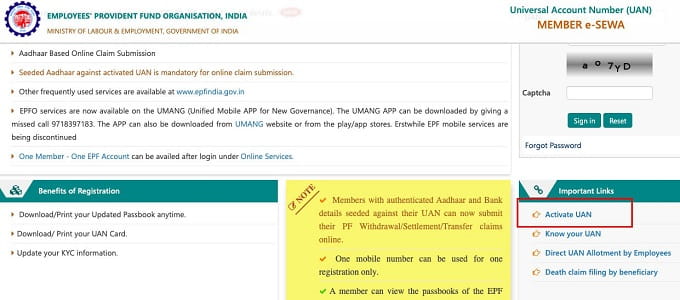
The most direct way to check whether your UAN is active is by attempting to log in to the EPFO unified member portal. If your UAN is active, you will be able to log in successfully. If it is not activated, you will receive an appropriate message. Here is how:
- Visit the EPFO unified member portal at unifiedportal-mem.epfindia.gov.in on your web browser.
- On the login page, enter your UAN number and the password you set at the time of activation.
- Enter the captcha code displayed on the screen and click Sign In.
- If you are able to log in successfully, your UAN is active and fully functional.
- If you receive an error message saying the UAN is not activated or credentials are invalid, your UAN needs to be activated before you can proceed.
Method 2: Using the Know Your UAN Status Option
If you do not remember your UAN or are unsure whether it has been generated for you, the EPFO portal provides a dedicated option to check your UAN status using your registered mobile number or Aadhaar. Follow these steps:
- Visit unifiedportal-mem.epfindia.gov.in and click on the option labelled Know Your UAN Status on the login page.
- Select your preferred verification option, either by entering your Member ID (provided by your employer) or by using your Aadhaar number or PAN.
- Enter your name, date of birth, and mobile number as registered in EPFO records.
- An OTP will be sent to your registered mobile number. Enter the OTP to verify your identity.
- The portal will display your UAN number along with its current activation status, confirming whether it is active or inactive.
Method 3: Through the UMANG App
The UMANG (Unified Mobile Application for New-age Governance) app is a Government of India platform that provides access to hundreds of government services including EPFO services. You can check your UAN status and access your EPF account through this app conveniently. Here is how:
- Download the UMANG app from the Google Play Store or Apple App Store on your smartphone.
- Register on the app using your mobile number and complete the OTP-based verification.
- Search for EPFO in the services section and tap on it.
- Select Employee Centric Services and then tap on View Passbook or Raise Claim.
- Enter your UAN and the OTP sent to your registered mobile number. If you are able to proceed and view account details, your UAN is active. If access is denied, your UAN is not yet activated.
Method 4: By Sending an SMS
EPFO provides an SMS-based service to check basic EPF account information, which can indirectly help you verify whether your UAN is active and linked. To use this service, send an SMS from your UAN-registered mobile number to 7738299899 in the format EPFOHO UAN ENG (replacing ENG with your preferred language code, such as HIN for Hindi). If your UAN is active and linked to your mobile number correctly, you will receive an SMS reply with your EPF account details including your name, PF balance, and last contribution date. If you do not receive a reply or receive an error message, it may indicate that your UAN is not properly activated or your mobile number is not linked.
Method 5: By Contacting Your Employer or HR Department
Your employer’s HR or payroll department is responsible for generating and sharing your UAN and for ensuring that it is activated in their system. If you are unsure about your UAN status, reaching out to your HR team is a quick and reliable option. They can confirm your UAN number, check whether it is active in the EPFO employer portal, and assist you in completing the activation process if needed. This is particularly useful for new employees who have recently joined a company and have not yet received their UAN activation details.
How to Activate Your UAN If It Is Not Active
If your UAN is found to be inactive after checking through any of the above methods, you can activate it yourself through the EPFO portal. Here is the step-by-step activation process:
- Visit unifiedportal-mem.epfindia.gov.in and click on Activate UAN on the login page.
- Enter your UAN number, member ID, Aadhaar number or PAN, name, date of birth, and mobile number.
- Click on Get Authorisation PIN. An OTP will be sent to your registered mobile number.
- Enter the OTP and click Validate OTP and Activate UAN.
- A system-generated password will be sent to your registered mobile number. Use this to log in and set a new password of your choice. Your UAN will now be fully active.
Common Reasons Why a UAN May Be Inactive
- The employee never completed the self-activation process on the EPFO portal after receiving the UAN from the employer.
- The mobile number linked to the UAN is no longer in use, preventing OTP-based verification.
- Aadhaar seeding with the UAN is incomplete, causing the account to remain in a partially active state.
- The employer has generated the UAN but not yet updated the KYC details, leaving the account in a pending activation state.
- Multiple UANs may have been issued to the same employee across different jobs, causing confusion. EPFO recommends merging duplicate UANs immediately through the portal.
Conclusion
Verifying whether your UAN is active or not is the essential first step toward accessing all EPFO online services including PF balance checks, passbook downloads, and online withdrawal claims. With multiple convenient methods available including the EPFO member portal, UMANG app, SMS service, and employer assistance, every employee can easily confirm their UAN status and activate it without any hassle. If you discover that your UAN is inactive, complete the activation process at the earliest to ensure uninterrupted access to your provident fund account and protect your retirement savings.